
Configure Discovery, Invites, Affiliates, and Growth Metrics
Make a community findable, choose the right invitation path, and measure referral growth.
In this guide2 sections and article resources
Article resources
Open Creator console → Settings → Growth for Discovery, Invite, Metrics, and Funnels where enabled.
Choose an acquisition path
- Discovery — review the identity, category, eligibility, public visibility, and destination shown in discovery surfaces.
- Invite — copy the About-page link, send one direct invitation, or import approved email addresses.
- Metrics — compare landing, acquisition, conversion, and attribution signals using the displayed window.
- Funnels — build and review focused offer pages; see the dedicated funnel guide before publishing or optimizing.
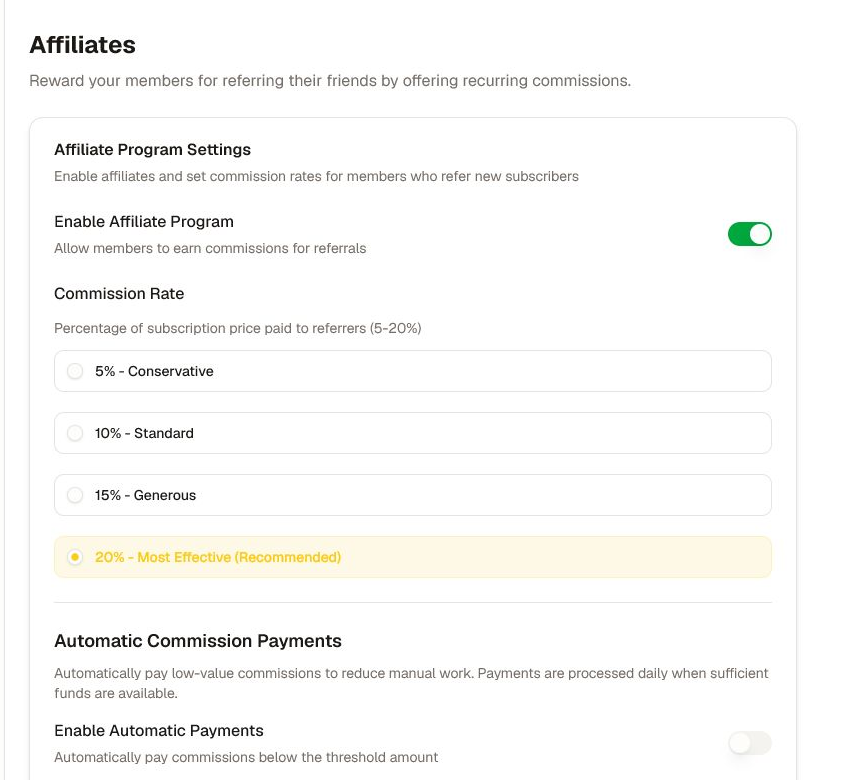
For referrals, open Settings → Monetization → Affiliates. Enable the program only after selecting a commission rate, payout process, and support policy. Members can use generated links; referral statistics show referrals, commissions, and conversion.
Verify attribution and consent
Test discovery, purchase/request access, single and CSV invitations, funnel conversion, and affiliate attribution with non-admin accounts. Use a unique test campaign and remove it from reports when supported.
Do not import purchased mailing lists, expose a member's referral data, or promise a payout policy the payment workflow cannot honor. Metrics can lag or use different attribution windows; compare like-for-like dates and sources before changing a campaign.
Was this helpful?
Your response helps us improve this guide.