
Configure Retention Health, Drafts, and Win-Back
Enable retention carefully, choose its autonomy, limit outreach, and review member-risk signals.
In this guide2 sections and article resources
Article resources
Open Creator console → Retention. This workspace is owner/admin gated. Its health and win-back signals help prioritize review; they are not a diagnosis or permission to message someone.
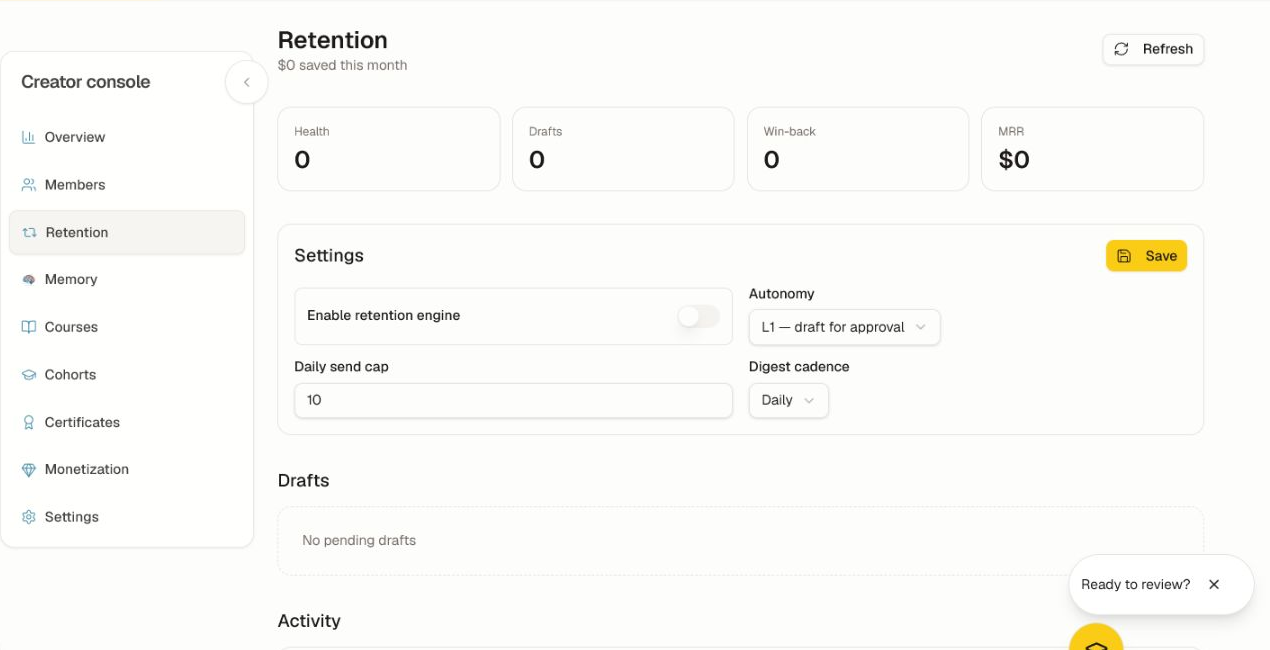
Configure safely
- Review Health, Drafts, Win-back, and MRR for the current community.
- Decide who owns message review, member replies, and escalation.
- Start with L1 — draft for approval so a person approves each message.
- Set a conservative daily send cap and digest cadence.
- Configure quiet hours, pause/mute behavior, and any higher-autonomy cap when those controls are available.
- Turn on the engine and choose Save.
Higher autonomy can send without per-message approval. Use it only after L1 drafts have been reviewed across languages, member segments, and edge cases.
Run the review loop
- Open Drafts and verify recipient, evidence, tone, link, offer, locale, and unsubscribe expectations.
- Approve, edit, or reject the draft using the available control.
- Watch Activity for delivery and response outcomes.
- Review the 30/60/90-day win-back stages and recent member activity before any nudge.
- Pause the engine if facts, targeting, or volume look wrong.
Do not include private learning, payment, support, or memory details that the recipient did not provide for this purpose. If a metric is empty, confirm the feature is enabled and enough real activity exists; do not generate test outreach to real members merely to populate the dashboard.
Was this helpful?
Your response helps us improve this guide.