
Manage Payments, Payouts, and Affiliate Earnings
Review payment methods and history, connect a payout account, and use referral links responsibly.
In this guide2 sections and article resources
Article resources
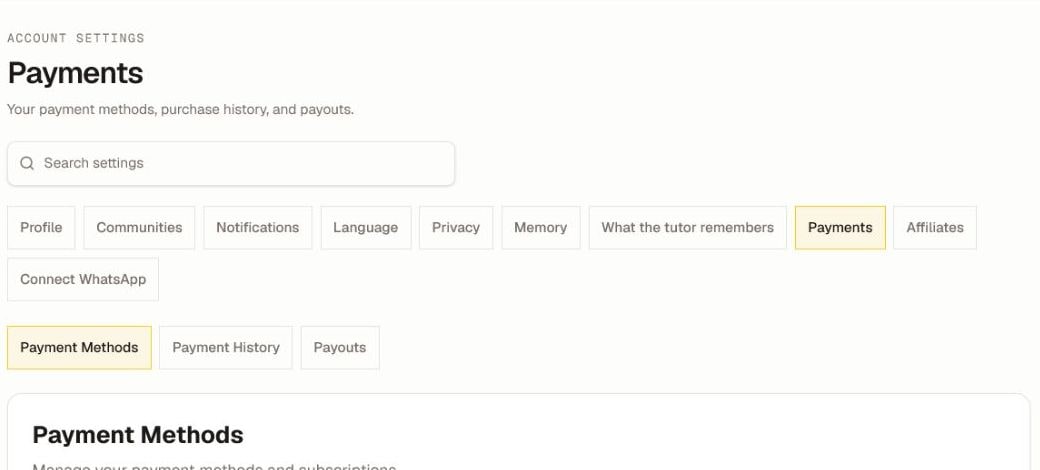
Open Settings → Payments. The section has three tabs:
- Payment Methods manages supported billing methods and related subscriptions.
- Payment History lists completed purchases and transactions after they are recorded.
- Payouts connects or reviews a Stripe account for eligible community or affiliate earnings.
Removing a payment method does not automatically cancel a membership. Review the subscription or community access terms separately before changing billing.
Use affiliate links
Open Settings → Affiliates to review referral totals, commission status, payout balance, Stripe connection, and available links.
- Select the platform or community you intend to promote.
- Generate or copy the referral link.
- Keep its referral parameter intact when you share it.
- Return to Affiliates to check pending, approved, and paid commission.
Commissions can remain pending during a review or refund window, and a minimum payout can apply. Referral availability and rates depend on platform and community rules.
Protect payment information
Complete card and bank onboarding only in the secure Payments or Stripe flow. Never enter card numbers, bank details, passwords, or verification codes in a community post, direct message, or tutor chat. If a transaction is missing, send support the date, amount, community, and non-sensitive receipt reference—not a full payment credential.
Was this helpful?
Your response helps us improve this guide.